 |
About
the
Simulator
|
|
|
|
|
| |
| EdSim51, developed by James Rogers, is a
simulator unlike the many industry-standard simulators that are widely
available - this simulator has the student in mind. Take a look at the
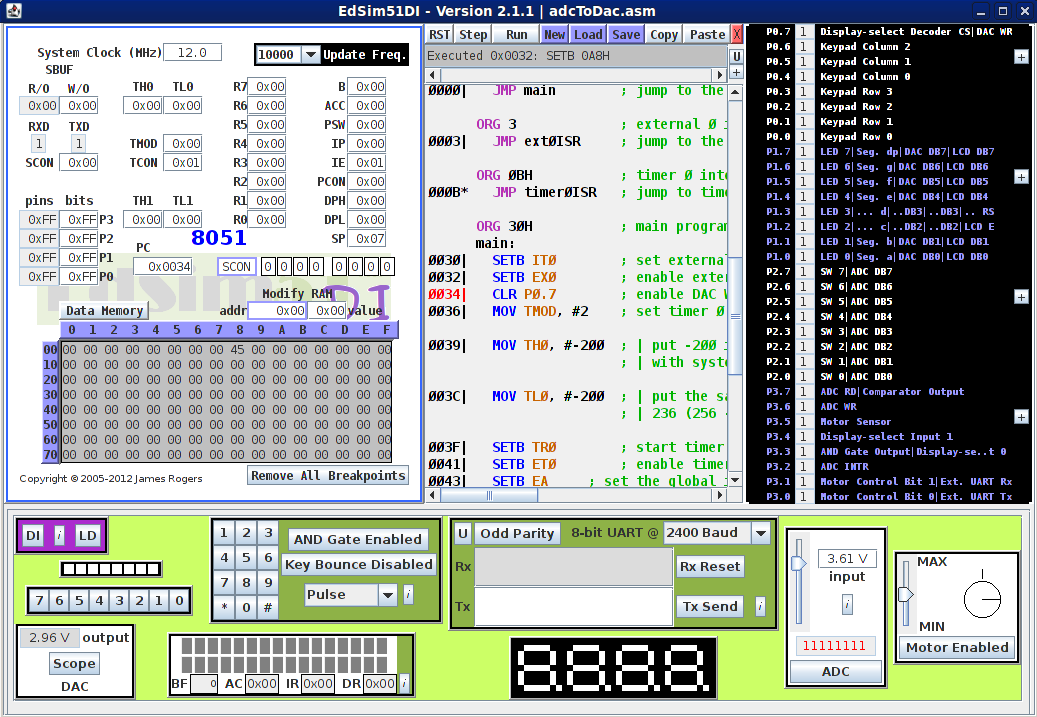
screenshot below: |
| |
|
| Screenshot of the EdSim51 Simulator | full-size image
|
| |
- The top left box gives the user access to all the 8051's
registers, data memory and code memory.
- In the centre is a textbox where the user either loads an
assembly program or writes the code directly.
Shown above is a program being single-stepped (execution is currently
at location 0034H in code memory - hence that line is highlighted).
- On the right is a list of the 32 port pins and what each
one is connected to. The current value of the port pin is displayed
here.
- The bottom panel shows all the peripherals that are
connected to the 8051.
|
| I hope this simulator will help students learn to write
programs to exercise the 8051. Students can begin by ignoring the
peripherals. In this way they can first become accustomed to the many
different move, arithmetic and branch instructions that make up the
8051 instruction set. |
| |
| As the students gain experience and confidence they can then
write code to scan a keypad, or count the motor's revolutions, or
multiplex 7-segment displays, etc. |
| |
Some of the peripherals share the same port pins. For
example, the 7-segment displays' data lines and the DAC are connected
to port 1. This means that, if the student wishes to use the display
and the DAC together, he/she must learn how to disable one to access
the other.
Or the peripherals can be moved - ie: connected to other port pins.
|
| |
| See the section Notes on
the EdSim51 Simulator for more information on how to use
the simulator. |
| |
| Please send your comments
with feedback, suggestions, or if you spot mistakes in either the
simulator or the notes. Thank you. |
| |
| |
| A
Note from the Developer - www.jameswrogers.com |
| While lecturing in electronics at IT Sligo,
I
searched the Internet for an 8051 simulator suitable for teaching but
to no avail. I therefore decided to develop my own simulator for the
basic 8051 with virtual peripherals attached to the four ports. After
about a year's working on the project, on and off, the result was the
EdSim51 simulator. I then put together a set of notes that are now the Beginner's
Guide
to
the 8051 on
this
website. |
| I decided to offer the simulator and notes free, in the hope
that students anywhere in the world might benefit from them. I continue
to support the simulator, adding features and fixing bugs that have
been kindly pointed out to me by users. I hope you find both the site
and the simulator useful and I would like to hear your experiences: Contact Us |
| |
| |
|
|
|
| |
|
Copyright
(c)
2005-2013 James
Rogers
|